
Google “Confidential Mode” is designed to ensure that only the recipient can view your mail, making it the most secure way of sending emails in Gmail.
What is Gmail Confidential Mode?
Messages sent in confidential mode will require the recipient to enter a code before they can access the sent mail.
Once you hit the send button, the recipient will be informed of a confidential email awaiting them, and to read it, they’ll have to verify their identity via a code sent via mail or to a number of your choice.
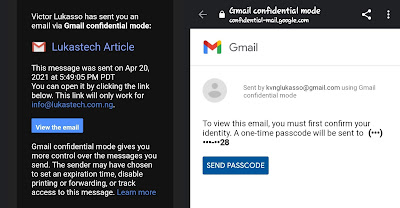
Contents of the mail won’t be included in this email; rather, it’ll be on Google’s servers. Also, know that you can set an expiry date for the mail.
How to Send Confidential Emails in Gmail
To send emails in confidential mode, follow the steps below (We’ll be using the web version in the steps below, but we’ll also learn how to send confidential emails on the Gmail app.
- Sign in to Gmail and click on the compose button at the top-left corner to begin writing a new email.
- Add your recipient’s email, subject, and the content of your email,
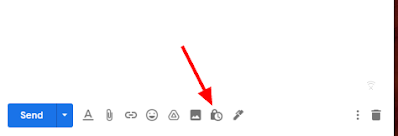
- Now, click on “Confidential Mode” at the bottom of the compose window (A padlock with a clock on it).
- Next, set your expiry period and choose if the recipient will need a passcode to access the mail or not. (If you choose “No SMS Passcode”, then the code will be delivered to the recipient’s email.
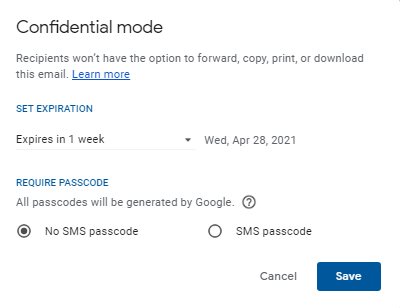
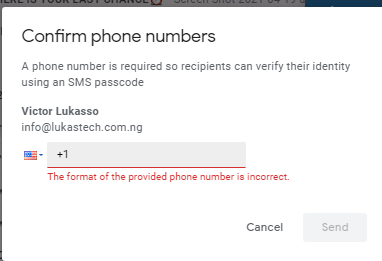
- Now, click on “Save” and cross-check your message before hitting Send. If you choose the SMS passcode in the previous step, then you’ll have to provide the recipient’s phone number before your message is sent. Do this carefully.
That’s all.
Meanwhile, if you’re using the Gmail app, when you get to point 3, simply
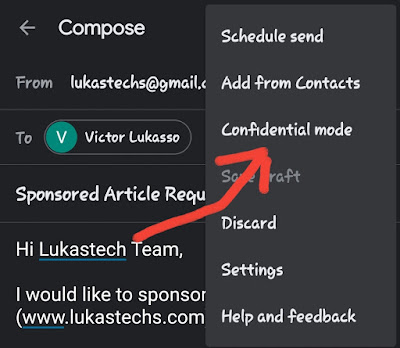
- Click on the 3-vertical dots on the right-hand side of the compose box.
- Select “Confidential Mode” from the list and continue the setup.
How to Remove Access to a Sent Confidential Mail
If you would like to remove access to a confidential message you’ve already sent. Then you should navigate to your sent Category where sent messages are stored.
Now, to “unsend” a confidential email, locate the message under the sent category and open it
Scroll down the mail and click the “Remove Access” link attached to it.
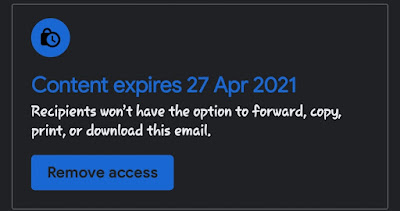
If the recipient hasn’t read the mail yet, then they won’t be able to gain access to it again.
Demerits of Gmail Confidential Mail
The Gmail confidential mail is quite insecure if you don’t request SMS passcode verification. Let’s say the recipients’ mail has been compromised – maybe it was logged into a public computer – then the verification is completely useless.
So, it’s advisable to provide a separate number for verification so that even if the mail has been compromised, the message can’t be accessed.
Kindly drop a comment below and share.
